How to publish news employees will actually read
If you manage an intranet, you've probably experienced this challenge: you publish important news, but you're not always sure if everyone will read it. Intranets compete with many other digital workplace tools like Microsoft Teams chats, emails, meetings, Engage conversations and more. According to a recent Gartner survey, 37% of respondents said they failed to notice important information because of the distraction of too many applications and the volume of information (2023 Gartner User Behavior and Influence Survey).
Communicators often ask us what they can do to bring people back to the intranet. If you have a SharePoint intranet, you actually have a lot of options.
In this post, we’ll share our tips on how to increase the reach of your internal communications and bring employees back to the intranet using the notification features in out-of-the-box SharePoint.
Improving news reach: the basics
If you want to improve the reach of your intranet news, make sure you have these fundamentals in place:
- Friction-free access. If there are too many usability issues, like two-factor authentication, it’s more likely that people might bail on the process. Make sure employees can open content quickly and easily.
- Relevant content. Nudges and notifications make it easier to grab people’s attention but doesn't guarantee they’ll read your message. Make sure content is valuable, relevant and useful to your audience. This is especially important for frontline or mobile workers who care about fundamentally different things than the office worker.
- Thoughtful notifications. If you used all the channels and types of notifications, you'd be creating extra noise, and that's just not helpful. Publish simple, efficient and friendly notifications across the right channels to create effective nudges.
- Measurement. As the saying goes, “you can’t improve what you don't measure.” Look at your analytics over the last five to ten news posts to understand your current reach before you start testing new approaches.
Pro tip
It can be difficult to pull meaningful data about your news performance from SharePoint OOTB or many intranet packaged solutions. GO Intranet includes a free subscription to Helm Insights, which tracks and compares reach, reactions and responses so that you can see which posts are driving the most engagement across your company.
Using SharePoint notifications
There are six different methods you can choose from when creating a notification or a multi-channel nudge in SharePoint.
1. Promote
This feature is part of the regular publishing workflow in SharePoint. It allows you to manually push content out to different channels whenever you publish a new page. The key options are:
Share page
- How it works: Immediately sends an auto-generated email to individuals you choose with a link to the page
- What it’s good for: Sending a brief reminder
Copy link to page
- How it works: Copies a link you can drop into an email, a newsletter, a Viva Engage post, or even a Microsoft Teams channel
- What it’s good for: Sending a more personalized message with a link
Send to email
- How it works: Provides a preview of the page itself that you can send out as a rich email
- What it’s good for: Testing and sending emails with a richer user experience
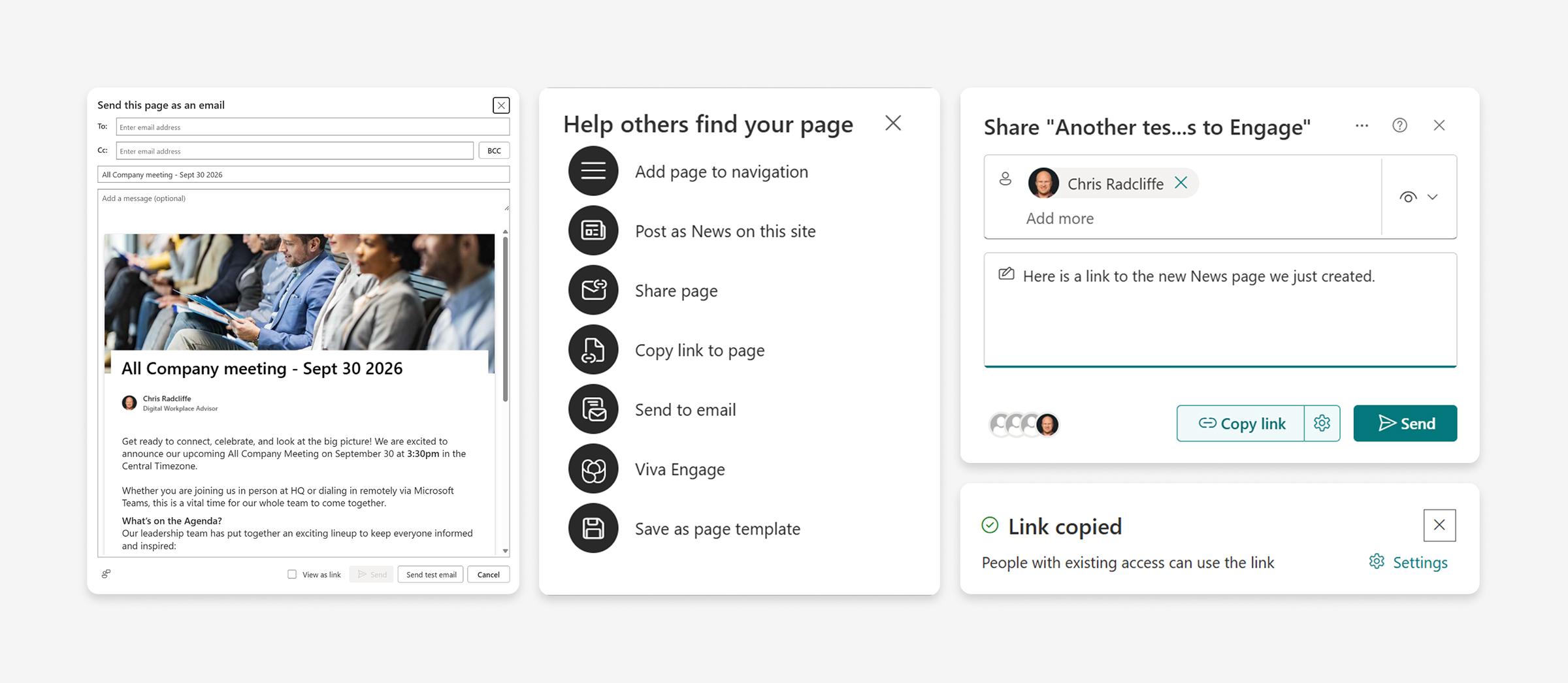
These are all simple, lightweight options that require manual setup, so they’re not well suited for multi-channel strategy or nudges.
2. Viva Amplify
Viva Amplify is a multi-channel publishing capability that Microsoft built to connect SharePoint, Microsoft Teams, email and Viva Engage. It requires a premium licence from Microsoft.
- How it works: You can use Viva Amplify to publish news across multiple channels, which creates a notification link back to your post.
- What it’s good for: Sending tailored messages across each channel
Pro tip
If you have multiple field worker communities, some using Viva Engage and others using Microsoft Teams, Viva Amplify can help bridge your communications across each of those channels.
Viva Amplify still requires manual effort – there's no automatic push notification.
3. Boost
If you're creating news on an organizational news site or a home site, you'll likely have the option to boost the page. This sends a push notification out if the page is audience targeted.
- How it works: Boost generates a mobile or Microsoft Teams notification to your page.
- What it’s good for: Sending out automatic notifications to audience-targeted groups
Pro tip
Boosting only works if the news page is already audience targeted and if it was made from a site that's called an organizational news site or a home site. Most companies aren't leveraging audience targeting for their news; to trigger a notification, you’ll need to target an all-company group.
4. Automatic notifications
SharePoint can generate mobile notifications under these scenarios:
- Site follows: When someone follows a site where the news is made, they'll receive a notification of any new news items that get created from that site. Unfortunately, employees rarely follow a site, so this isn't a reliable option.
- Proximity trigger: When news is created by someone who's close to you in the organization chart and the proximity score is high, you'll get a notification. This only triggers notifications for a small number of employees, so it's not a reliable option for an enterprise.
5. SharePoint Announcements
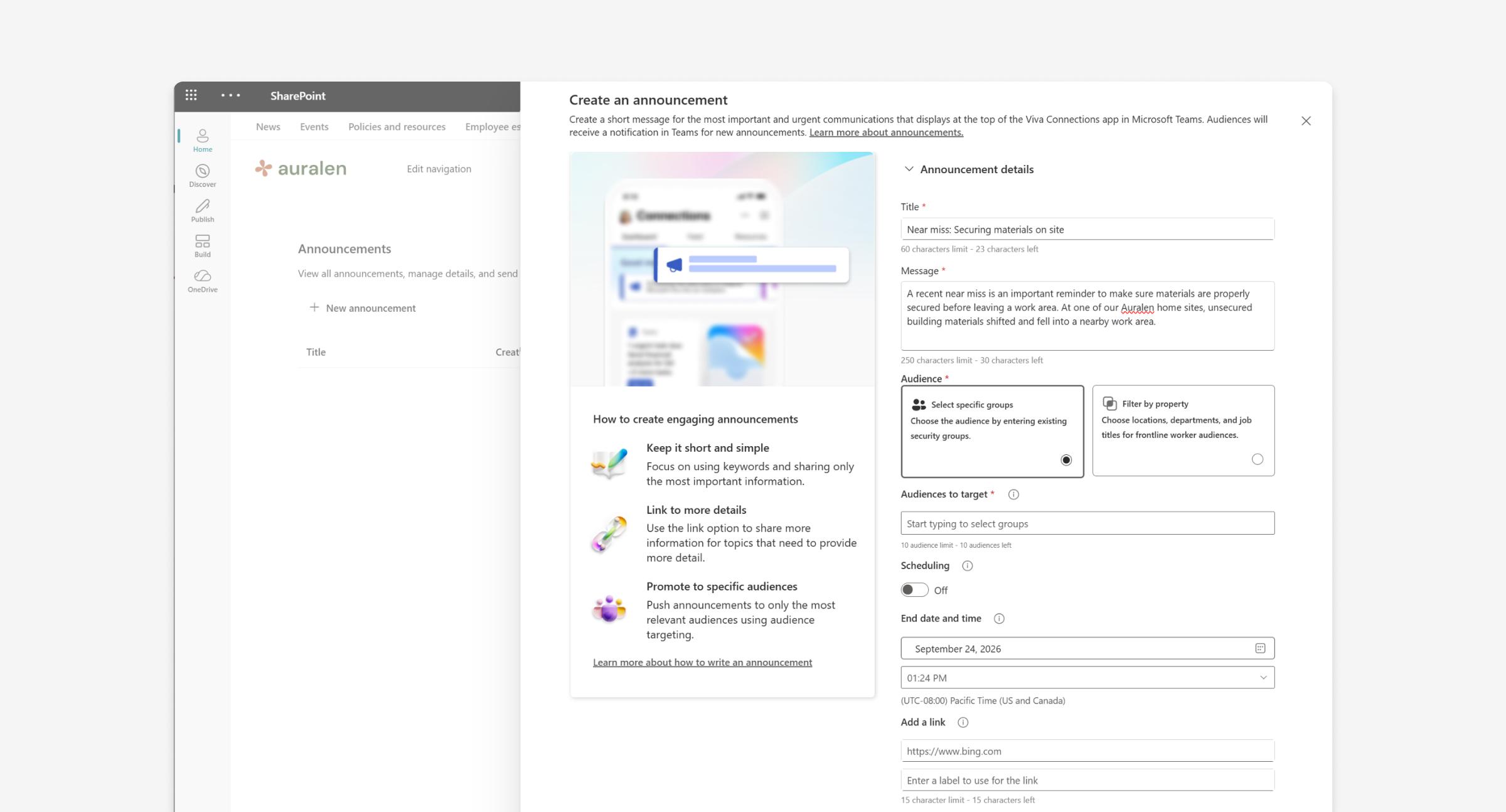
This feature is now free to use as part of your regular SharePoint licence.
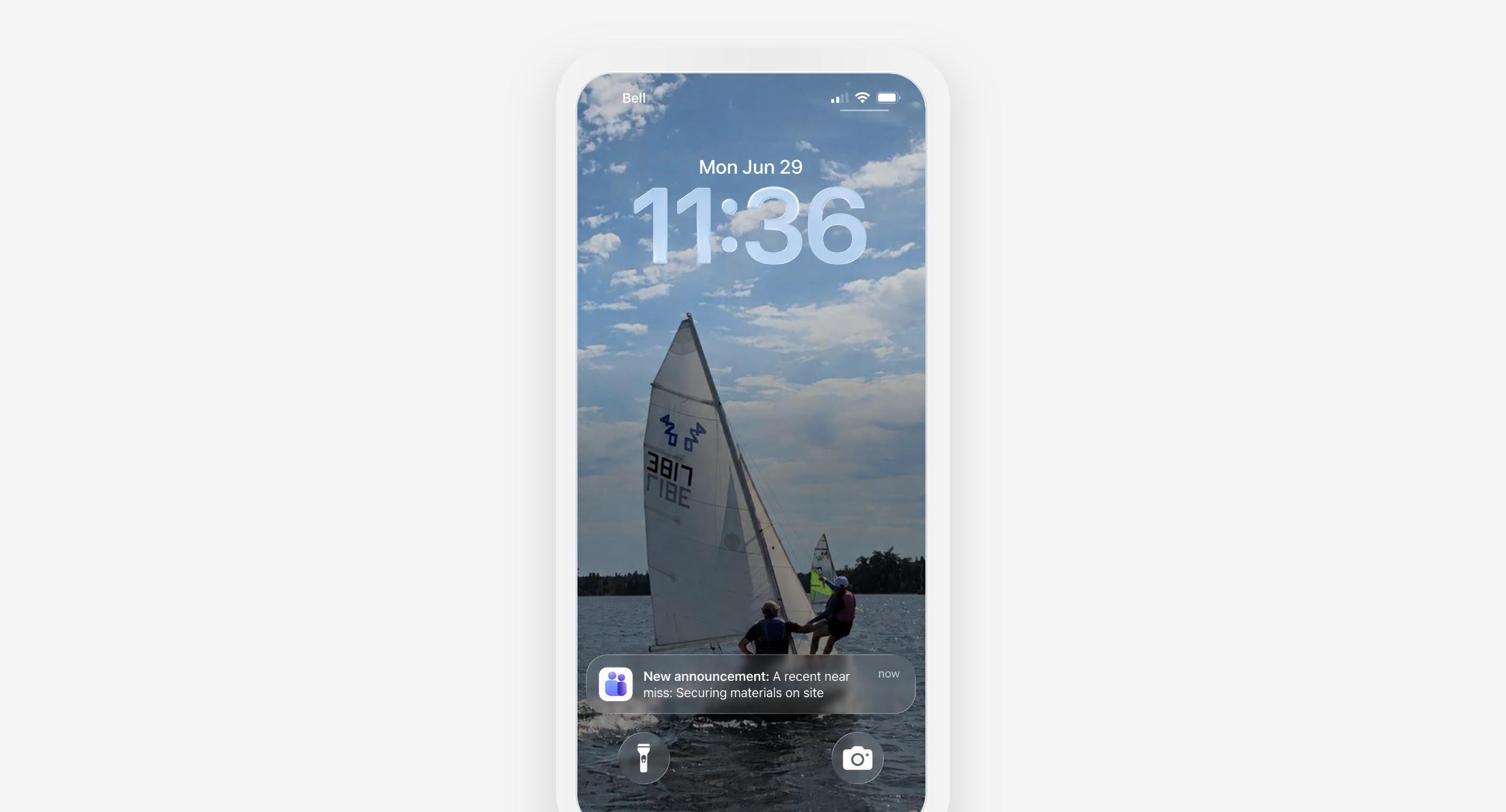
- How it works: Triggers notifications in Microsoft Teams or mobile devices
- What it’s good for: Targeting audiences and scheduling when you want the announcement to be live. Announcements also open in the SharePoint mobile app for Teams. Communicators have been looking for this capability for a long time to help with both mobile and frontline worker scenarios.
To learn how to set up SharePoint announcements, watch our webinar: Increase news reach with SharePoint notifications.
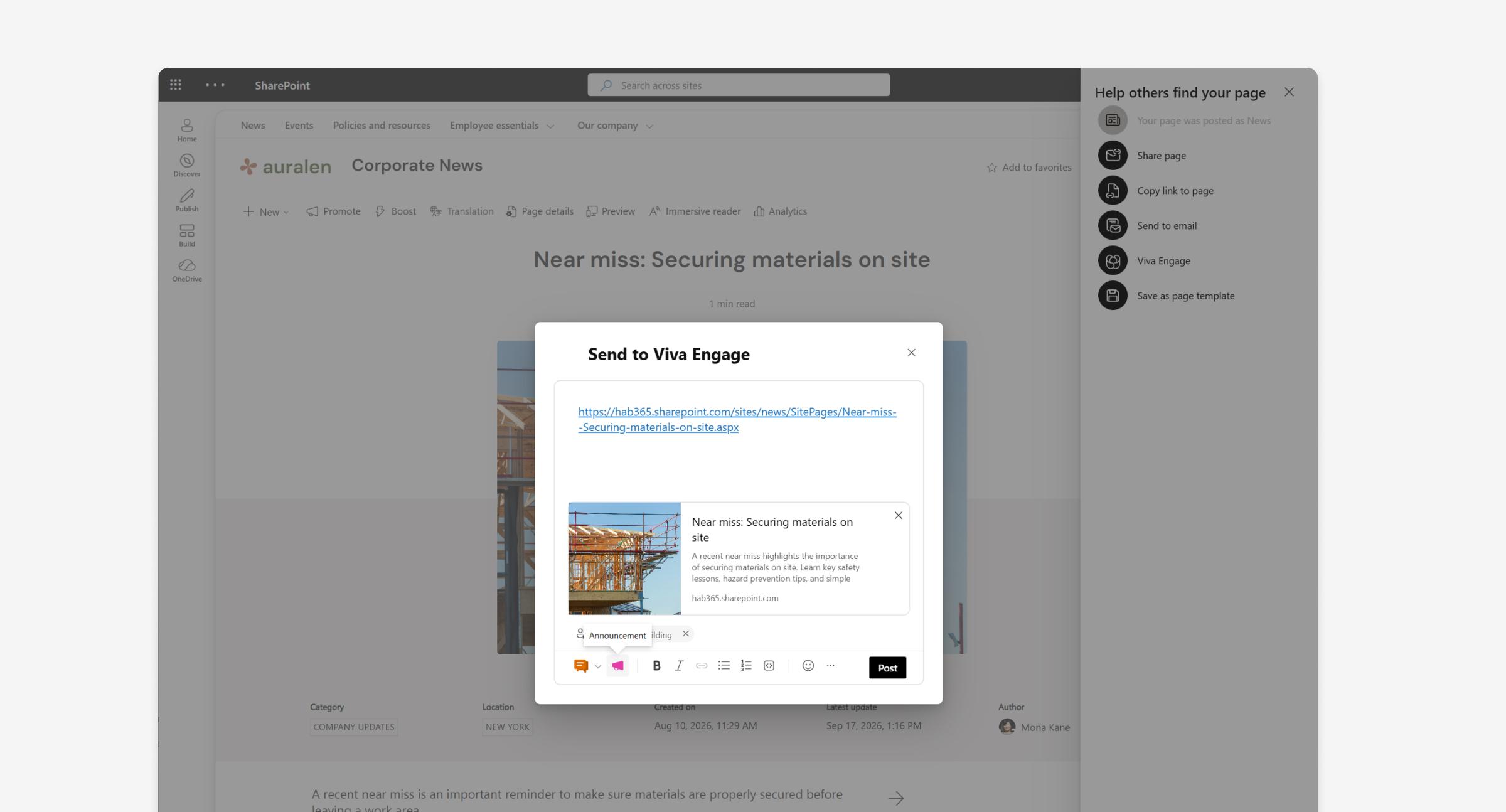
6. Cross-post to Viva Engage
Many companies use Viva Engage to foster rich conversations across different employee groups called communities. With Viva Engage’s announcement capability, you can create an announcement in Engage that triggers a notification to that particular community group. Members of the group get a push notification, as well as a reminder two hours later in case they missed it.
You can now also connect SharePoint news pages to an Engage community post. By doing that, you connect the comments on the SharePoint news page with the conversations that occur within Engage, and you can use the underlying announcement capability within Engage to signal attention to the post.
- How it works: You can cross-post a news page into Engage and mark it as an announcement.
- What it’s good for: Extending your news reach while maintaining a connected conversation across both channels
This is an example of what it looks like today to send a SharePoint news page into Engage. If you're an admin of that community, you'll have the option to trigger an announcement with the post.
For a detailed walkthrough of cross-posting to Viva Engage, watch our webinar: Increase news reach with SharePoint notifications.
Multi-channel strategy
Publishing content doesn't guarantee reach, but great results come when you start amplifying your news with thoughtful notifications and when you target reminders to specific audience groups.
In addition to the approaches we’ve outlined in this post, you could also consider a multi-channel strategy. Try using Amplify or leveraging automatic notifications with SharePoint announcements or the new feature that cross-posts SharePoint news into Engage. The only catch to remember with both approaches is that as an author, you need to remember what groups you're targeting and be sure that they exist either in Entra or Engage.
For many organizations, the right approach could be different. You'll likely want to use a combination of tactics depending on your target audiences and the content’s priority. Remember, the goal isn't to use every channel and tactic as much as possible, but to balance the right nudges at the right time for the right audience.